Seeing inside my chatbot: observability with Langfuse
My site's chatbot makes two AI calls for every message — one to answer, one to grade the answer. For weeks I ran that pipeline half-blind. Langfuse is the open-source tool that let me finally see inside it.
Every message the chatbot on this site answers is two AI calls, not one. A fast model (Llama 3.1, via Groq) writes the reply in about 200 milliseconds, then a separate model from a different family (gpt-oss-120b) scores that reply on accuracy, voice, privacy, and helpfulness. For weeks I ran that pipeline half-blind. I could see the final answer in the UI, but not the latency, not the token cost, and not why a particular reply scored a 2 instead of a 4.
Langfuse fixed that. It's an open-source observability platform for LLM apps — think of it as the x-ray you bolt onto an AI feature so you can finally see inside it. One small SDK wrapper around my model calls, and every conversation became a trace I can open, read, and debug. Repo: github.com/langfuse/langfuse.
Each visitor message creates one trace. Inside that trace are the two calls that make up the pipeline: the fast generation step and the judge scoring step. I attach the four quality scores the judge produces — accuracy, voice, privacy, helpfulness — directly onto the trace as Langfuse scores.
That structure lets me ask questions I couldn't before. Which replies scored below three? How long did the slow path take when both models ran? What did the visitor actually ask right before a low score? Before Langfuse, answering any of those meant scattering console logs and reading them by hand. Now it's a filter in a dashboard.
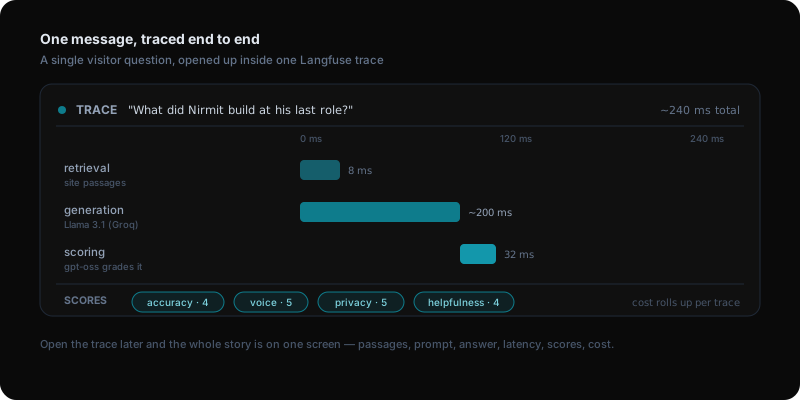
Here's what a single conversation looks like from the inside. A visitor types What did Nirmit build at his last role? and hits send. The moment that request lands, my /api/chat route opens a Langfuse trace and the work hangs off it as nested spans.
The first span is retrieval: I pull the handful of site passages most relevant to the question and pin the current post if the visitor is reading one. The second span is generation: those passages plus the question go to a fast Llama model (Llama 3.1, via Groq), which streams back an answer in roughly 200 milliseconds. The third span is scoring: I hand a different-family model — gpt-oss-120b — the question and the generated answer and ask it to grade four things — is this accurate to what the site actually says, does it sound like me, does it leak anything private, is it genuinely helpful. It returns four numbers and I write them onto the trace.
Open that trace later and the whole story is on one screen: the exact passages retrieved, the prompt that went to Llama, the answer it produced, the 200 ms it took, the judge scores, and the token cost of both calls added up. When a reply is wrong, I no longer guess which step failed — I read it.
Three things earn their keep.
Latency, split by step. The fast answer and the scoring pass show up as separate spans, so when something feels slow I know which model to blame instead of guessing.
Cost per conversation. Token usage and cost roll up per trace, so I can see what a typical exchange actually costs me — and catch it early if a prompt change quietly doubles the bill.
The low-scoring tail. Sorting by score surfaces the handful of conversations where the bot was hedgy, off-voice, or wrong. One trace showed the judge giving a low accuracy score because Llama had confidently answered a question the site simply doesn't cover — the kind of polite hallucination you'd never catch by eye. I tightened the system prompt to say "I don't know" when the retrieved passages don't support an answer, replayed that conversation, and watched the score climb. Those flagged traces became my test set: before I ship a prompt change, I replay the worst past conversations through the new version and check the scores move the right way.
Before Langfuse I could see the answer but not why it scored a two. Now every conversation is a trace I can open.
You can run Langfuse two ways: their hosted cloud (free tier, fastest to try) or self-hosted with Docker if you want the data on your own machine. To self-host:
git clone https://github.com/langfuse/langfuse
cd langfuse
docker compose up
Create a project, copy the public and secret keys, and drop them into your environment. Then wrap your LLM calls with the SDK — for most setups it's a few lines, or a single integration if you already use the OpenAI or LangChain SDKs.
The thing I'd tell anyone shipping an AI feature: add observability before you think you need it. The first time a user reports a bad answer, you want a trace to open, not a shrug.
Building AI products in public.
Occasional notes on what I'm shipping, what's working, and what broke — straight to your inbox. No spam, unsubscribe anytime.
Product leader shipping across enterprise SaaS, AI in production, and 0→1. Writing about what actually ships — not what sounds good in a deck.