Next.js is the framework I picked because of the chatbot
For a static portfolio I could have used something simpler. But the moment you add a chatbot that talks to an AI, you need a framework that handles both static pages and live server calls.
For a portfolio I could have used a simple website builder, plain HTML, or a lightweight framework. I picked Next.js because of the chatbot. The moment your site needs to make live calls to an AI service, you need a framework that handles both static content (the blog, the about page) and dynamic server calls (the chatbot) in the same project. Next.js does both without juggling two separate systems.
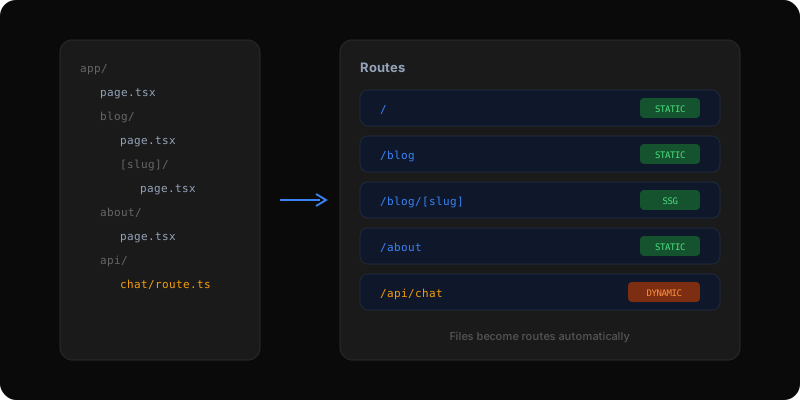
Most of this site sends zero code to the visitor's browser. The blog posts, the about page, the portfolio items are all pre-built as plain HTML at deploy time. Only the interactive parts — the chatbot, the 3D hero, the scroll animations — send any code to the browser. This means the site loads fast by default, and you only pay the performance cost for the parts that actually need interactivity.
The URL structure is based on how you organize your files. Put a file called page.tsx inside a folder called blog, and you automatically get a page at /blog. Create a folder called [slug] inside blog, and you get dynamic pages like /blog/tool-vercel or /blog/tool-framer-motion. This portfolio's blog has one template file that powers every single post across three different content sources: essays, case studies, and featured posts.
The chatbot on this site lives at /api/chat. In Next.js, that is just a file inside the api folder. When a visitor sends a message, the browser calls that URL, and the server-side code runs — connecting to the AI service, processing the response, and streaming it back. No separate server needed, no deployment configuration. The same deploy that serves the static blog also handles the live chatbot.
Another example: the blog post pages. I have one template file that handles every blog URL. At build time, Next.js looks at all my posts (essays, projects, featured posts) and pre-generates a static HTML page for each one. When a visitor loads /blog/tool-vercel, they get instant-loading static HTML. No JavaScript needed to render the content, no API calls, no loading spinners. The page just appears.
The featured post strip on the /blog page is similar. It sorts all featured posts by date, picks the three most recent, and renders them into a dark-background card layout — all at build time.
Create a new project with the Next.js starter. It sets up everything: the file-based routing, the build system, TypeScript, and styling. From there, every file you add to the app folder becomes a page.
Pages are server-rendered by default — fast, with no JavaScript sent to the browser. When you need interactivity (a button that responds to clicks, a chatbot that streams messages), you add a special marker at the top of the file that tells Next.js to include the necessary browser code for that component.
The downside: the build is slower than I would like, and the error messages when something goes wrong can be confusing. I shipped one broken page because a warning during development looked harmless but turned out to be a real problem. Now I treat every build warning as a bug, even when the framework says it is fine.
Building AI products in public.
Occasional notes on what I'm shipping, what's working, and what broke — straight to your inbox. No spam, unsubscribe anytime.
Product leader shipping across enterprise SaaS, AI in production, and 0→1. Writing about what actually ships — not what sounds good in a deck.